Tuesday, August 16, 2022

Consuming ASP.NET Web API REST Service In ASP.NET MVC Using HttpClient

 Steps to Consume Web API in MVC.


Step1: Install HTTP Client library from NuGet.

What is HttpClient?

HttpClient is base class which is responsible to send HTTP request and receive HTTP response resources i.e from REST services.

Step2:Install WebAPI.Client library from NuGet


Step3: Add Model and Controller class.

Step4: 

Our hosted Web API REST Service includes these two methods, as given below.


GetAllEmployees (GET )

GetEmployeeById (POST ) which takes id as input parameter

We are going to call GetAllEmployees method which returns the all employee details ,The hosted web api REST service base URL is http://192.168.95.1:5555/ and to call GetAllEmployees from hosted web API REST service, The URL should be Base url+api+apicontroller name +web api method name as following,


http://192.168.95.1:5555/api/Employee/GetAllEmployees

In the preceding url

http://localhost:56290 Is the base address of web API service, It can be different as per your server.

api It is the used to differentiate between Web API controller and MVC controller request .

Employee This is the Web API controller name.

GetAllEmployees This is the Web API method which returns the all employee list.


using ConsumingWebAapiRESTinMVC.Models;
using Newtonsoft.Json;
using System;
using System.Collections.Generic;
using System.Net.Http;
using System.Net.Http.Headers;
using System.Threading.Tasks;
using System.Web.Mvc;

namespace ConsumingWebAapiRESTinMVC.Controllers
{
    public class HomeController : Controller
    {
        //Hosted web API REST Service base url
        string Baseurl = "http://192.168.95.1:5555/";
        public async Task<ActionResult> Index()
        {
            List<Employee> EmpInfo = new List<Employee>();
            using (var client = new HttpClient())
            {
                //Passing service base url
                client.BaseAddress = new Uri(Baseurl);
                client.DefaultRequestHeaders.Clear();
                //Define request data format
                client.DefaultRequestHeaders.Accept.Add(new MediaTypeWithQualityHeaderValue("application/json"));
                //Sending request to find web api REST service resource GetAllEmployees using HttpClient
                HttpResponseMessage Res = await client.GetAsync("api/Employee/GetAllEmployees");
                //Checking the response is successful or not which is sent using HttpClient
                if (Res.IsSuccessStatusCode)
                {
                    //Storing the response details recieved from web api
                    var EmpResponse = Res.Content.ReadAsStringAsync().Result;
                    //Deserializing the response recieved from web api and storing into the Employee list
                    EmpInfo = JsonConvert.DeserializeObject<List<Employee>>(EmpResponse);
                }
                //returning the employee list to view
                return View(EmpInfo);
            }
        }
    }
}
C#


Thursday, July 21, 2022

Web API Securities JWT Token.

 What is JWT Token?

JWT stands for Jason Web Token.

Token-based security is commonly used in today’s security architecture. There are several token-based security techniques. JWT is one of the more popular techniques. JWT token is used to identify authorized users.

What is the JWT WEB TOKEN?

Open Standard: Means anywhere, anytime, and anyone can use JWT.

Secure data transfer between any two bodies, any two users, any two servers.

It is digitally signed: Information is verified and trusted.

There is no alteration of data.

Compact: because JWT can be sent via URL, post request & HTTP header.

Fast transmission makes JWT more usable.

Self Contained: because JWT itself holds user information.

It avoids querying the database more than once after a user is logged in and has been verified.


JWT is useful for:

Authentication

Secure data transfer

JWT Token Structure 

A JWT token contains a Header, a Payload, and a Signature. 


Header

Header contains the algorithms like RSA or HMACSHA256 and the information of the type of Token.

  1. {  
  2.    “alg” : ”” Algorithm like RSA or HMACSHA256  
  3.    “Type” : ”” Type of JWT Token  
  4. }  

Payload

Payload contains the information of rows, i.e., user credentials.

  1. {  
  2.    “loginname” : ”Gajendra”  
  3.    “password”:”123#”  
  4. }  
  • It contains claims.
  • Claims are user details or additional information

Signature

{ base64urlencoded (header) +”.”+ base64urlencoded (payload) +”.”+ secret }

  • Combine base64 encoded Header , base64 encoded Payload with secret
  • These provide more security.

  • A combination of all headers, payload and signatures converts into JWT TOKEN.

How Does JWT Work?

Step 1 :
 
Client logs in with his/her credentials.


Step 2:

Server generates a Jwt token at server side. 


Step 3 :                                                                                                                                                 
After token generation, the server returns a token in response.                                                       


Step 4:                                                                                                                               
Now, the client sends a copy of the token to validate the token. 


Step 5                                                                                                   
 
The server checks JWT token to see if it's valid or not.


Step 6 :                                                                                                                         
 After the token is validated, the server sends a status message to the client.


The server can trust the client because the JWT is signed, and there is no need to call the database to retrieve the information you already stored in the JWT.

To keep them secure, you should always store JWTs inside an httpOnly cookie. This is a special kind of cookie that’s only sent in HTTP requests to the server. It’s never accessible (both for reading or writing) from JavaScript running in the browser.

https://blog.logrocket.com/jwt-authentication-best-practices/


Steps to Implement JWT Authentication in Asp.net Core

  • Understanding JWT Authentication Workflow.
  • Create Asp.net Core Web API project
  • Install NuGet Package (JwtBearer)
  • Asp.net Core JWT appsetting.json configuration
  • Asp.net Core Startup.cs - configure services add JwtBearer
  • Create Models User, Tokens
  • Create JWTManagerRepository to Authenticate users and generate JSON Web Token.
  • Create UserController - Authenticate action method.

https://codepedia.info/jwt-authentication-in-aspnet-core-web-api-token


Thursday, August 26, 2021

Web API Filters

 Web API Filters=>


Web API includes filters to add extra logic before or after action method executes. Filters can be used to provide cross-cutting features such as logging, exception handling, performance measurement, authentication and authorization.


Filters are actually attributes that can be applied on the Web API controller or one or more action methods. Every filter attribute class must implement IFilter interface included in System.Web.Http.Filters namespace. However, System.Web.Http.Filters includes other interfaces and classes that can be used to create filter for specific purpose.


Filter TypeInterfaceClassDescription
Simple FilterIFilter-Defines the methods that are used in a filter
Action FilterIActionFilterActionFilterAttributeUsed to add extra logic before or after action methods execute.
Authentication FilterIAuthenticationFilter-Used to force users or clients to be authenticated before action methods execute.
Authorization FilterIAuthorizationFilterAuthorizationFilterAttributeUsed to restrict access to action methods to specific users or groups.
Exception FilterIExceptionFilterExceptionFilterAttributeUsed to handle all unhandled exception in Web API.
Override FilterIOverrideFilter-Used to customize the behaviour of other filter for individual action method.

Saturday, March 6, 2021

Few important question about Web Services.

 What the components of a Web Service?

SOAP (Simple Object Access Protocol)

UDDI (Universal Description, Discovery and Integration)

WSDL (Web Services Description Language)


What is the purpose of SOAP in a web service?

A web service takes the help of SOAP to transfer a message

Different between SOAP and RESTFUL webservice in C#

I am sure everyone of us has sign-up in an online shopping website at least once. Let me consider Myntra or Paytm. When you visit the site, you come across three ways of signing up, either you can use your Facebook or Google credentials or can simply fill up a registration form for the same. When you select Google and you are only asked for your google credentials and your Myntra account is created in fraction of seconds. Isn’t that great!! But the question here is, does Myntra has access to Google’s database? OBVIOUSLY NOT!! Myntra has simply integrated Google API within their website.


Now what is this API in front of Google? When you click on Google to sign-up, Myntra takes your credentials and forwards them to Google and Google sends the user data like user Name, Image, Email Id as a response which is utilized by Myntra to create the account. In short, there is some sort of data exchange between two domains, Myntra and Google. So, the one who is responsible to process the request-response communication is known as API – Application Programming Interface. APIs are few lines of code which takes the request from the requester and gives back the response in form of data. 


Are API And Web Services Similar?

An obvious question which popped-up in your mind is, So Web Service and API are same, right? My answer is, IT’S NOT. All web services are API but not all APIs are web service. Confused?? Let me explain.

As I mentioned earlier APIs are few lines of code which takes the request from the requester and gives back the response in form of data. Now suppose you are creating a utility class where you have written certain methods and can be reused in other different classes. In this case also we are exchanging data but not making use of any HTTP protocols or networks. Hence, I can term my utility class as an API but not as a Web Service. 

The most popular Web Service Protocols are

SOAP – Simple Object Access Protocol

REST – Representational State Transfer


SOAP:

Recently I mentioned that web services can be called by any application irrespective of the platform being used to write the code. Now imagine a scenario where this wouldn’t have been possible. So, for every platform, there must be a web service and for every web service managing different code, HTTP or network would result in difficult maintenance.

To enable different application to use the same web service, there has to be an intermediate language – XML (Extensible Markup Language). Almost every coding platform understands XML. But the drawback is XML don’t have any fixed specification across the programming languages. Hence to avoid such scenario, SOAP protocol was introduced. SOAP is an XML-Based protocol to work over HTTP which has few fixed specifications to be used across all programming languages. 

SOAP specification is known as SOAP Message. 

Following are the building blocks in a SOAP Message.


SOAP Envelope: Recognizes where the XML is a SOAP. This element is mandatory.

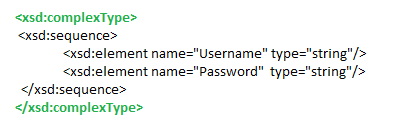
SOAP Header: Contains header information. For e.g. we need to pass username and password as a mandatory parameter in the request. We can define the same along with the datatypes under ComplexType tag. See below. This element is optional.

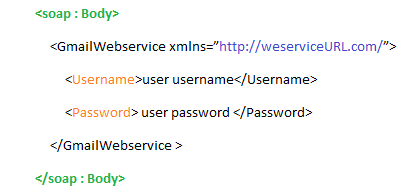
SOAP Body : Contains the web service URL and the elements to be passed with the request, i.e. ComplexType values.


REST-based Web Service

SOAP requires a good amount of bandwidth to exchange data. Due to the complex structure, a small group of developers came up with REST, architectural based web services, i.e. defined HTTP methods by which two applications can exchange data along with different formats like JSON, XML, Text to exchange data and response code to identify the response status. JSON is the most popular format.Following four HTTP methods are commonly used in REST-based architecture.


GET – to fetch data from the application


POST – if you want to send new data to the application for processing


DELETE – if you wish to remove an existing data


PUT – if you wish to update any existing data


Difference Between SOAP And REST

SOAP
REST
Slower due to defined specification
Faster as there is no defined specifications
Request and response format is always XML
Request and Response can be either in XML, JSON or plain text.
Requires bandwidth as the amount of data to transfer is a lot
Can work perfect even in case of low bandwidth
It is a protocol that defines some specifications which are to be followed strictly
Due to its architectural approach, it doesn’t have any strict specification
Less preferred due to its complex design
Easy to implement
Highly secure as it has its own security.
Doesn’t have its own security. Hence depends on application defined security
HTTP SSL Encryption and WS-Security encryption are used to secure SOAP messages
Data can be secured only by HTTP SSL Encryption
No need of caching mechanism
Requires caching mechanism
Can communicate over HTTP as well as SMTP
Can communicate only over HTTP

Choosing Between SOAP and REST

Use SOAP for,
  • if your application requires high level of security

  • Both consumer and provider should agree to the specification format

    Use REST for,
    • If each operation, i.e. Create, Read, Update, and Delete are independent of each other

    • If you need to cache any information

    • The bandwidth is limited


SOAP vs REST web services

Parameter
SOAP
REST
Acronym
SOAP stands for simple object access protocol
REST stands for REpresentational State Transfer
Protocol vs Architectural style
 SOAP is a standard protocol to create web services
Rest is architectural style to create web services.
Contract
Client and Server are bind with WSDL contract
There is no contract between client and Server.
Format Support
SOAP supports only XML format
REST web services supports XML, json and plain text etc.
Maintainability
SOAP web services are hard to maintain as if we do any changes in WSDL , we need to create client stub again
REST web services are generally easy to maintain.
Service interfaces vs URI
SOAP uses Service interfaces to expose business logic
Rest uses URI to expose business logic
Security
SOAP has its own security : WS-security
Rest inherits its security from underlying transport layer.
Bandwidth
SOAP requires more bandwidth and resources as it uses XML messages to exchange information
REST requires less bandwith and resources. It can use JSON also.
Learning curve
SOAP web services are hard to learn as you need to understand WSDL , client stub
REST web services are easy to understand as you need to annotate plain java class with JAX-RS annotations to use various HTTP methods.


Web API Versioning.

 Implement the new feature without impacting the existing consumers we can solve this problem by API versioning. When the business has start...